AI skin analysis for your Magento store.
Add a face scan to any storefront page. Oyster reads the skin accurately on every tone, builds a routine from your own catalogue, fills the Magento cart, and ties every order back to the scan that produced it.
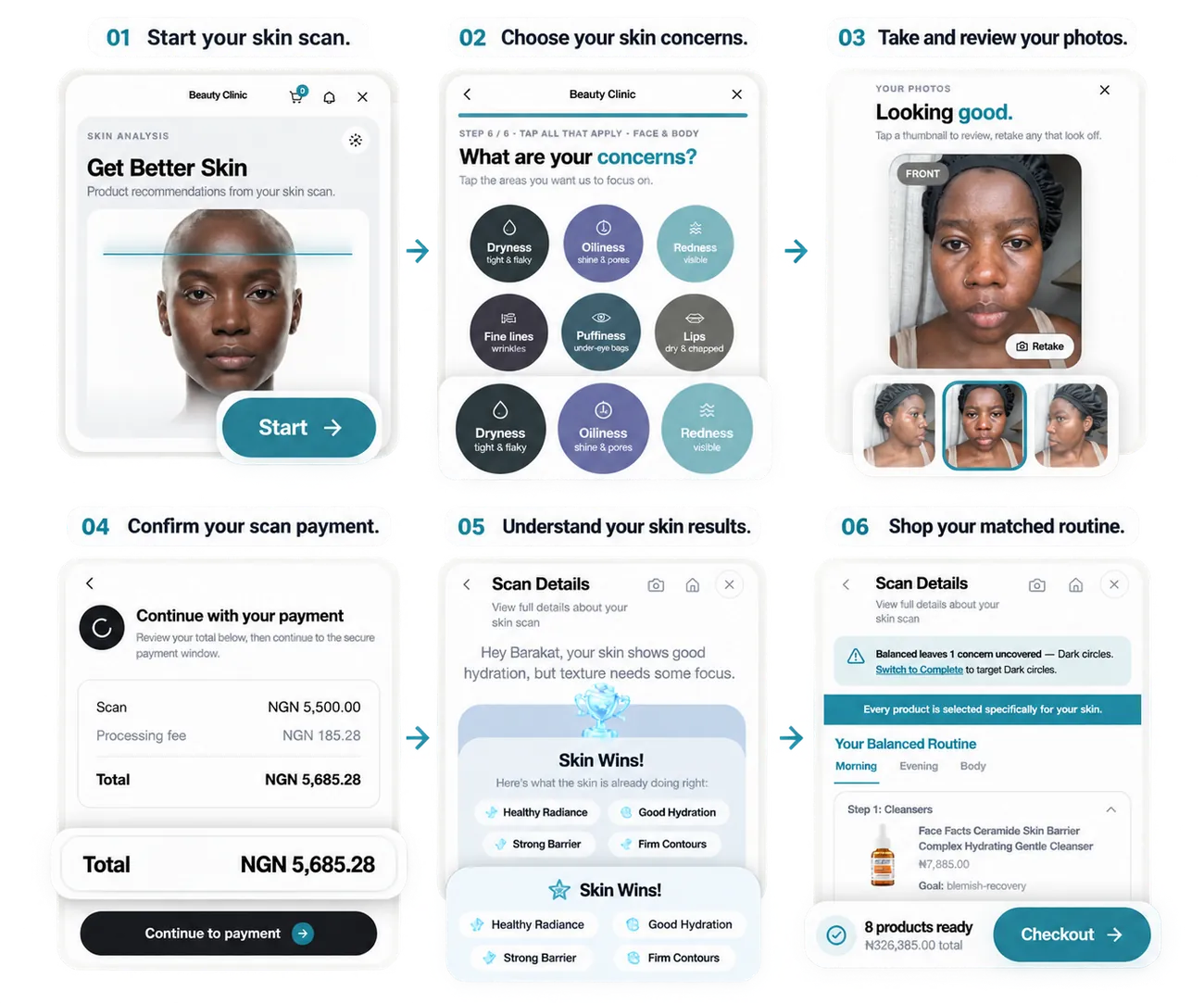
From a scan to an order on your store.
Oyster handles the skin analysis and product matching, with human aesthetician support. Customers use your existing Magento cart and checkout.
Open
A shopper starts the scan from a widget or block placed on a CMS page or a product page.
Scan
Oyster reads the face across 3000+ concerns, accurate on every skin tone.
Match
A routine comes back, built only from products that synced from your catalogue.
Cart
The server checks the recommended products and adds them to the shopper’s Magento cart.
Checkout
They check out on your store, with your own payment methods, taxes and emails.
Attribute
Paid orders are recorded in Oyster without changing fulfilment.
Set up your storefront in an afternoon.
Install through Composer or the Adobe Commerce Marketplace, run the upgrade and choose where the scan appears. No front-end build is required.
Install and upgrade
Pull the extension in with composer require oyster/module-scan or install it from the Adobe Commerce Marketplace, then run bin/magento setup:upgrade.
Connect your store
Open the Oyster section in Admin, sign in with your Oyster vendor account and confirm with the one time code we email. The store gets its own encrypted credential.
Choose what syncs
Nothing syncs until you pick a scope: the whole catalogue, or only the categories you select. Then let the indexers run the first import.
Place the scan
Add the Oyster widget or block to any CMS page or product page, or turn on the floating launcher.
Recommendations built from your own products.
Oyster never recommends what you do not stock. Simple and configurable products sync through background indexers, so saving a product never waits on the network. Only items in your catalogue and in stock can be recommended.
What syncs
Imported automatically for each product you select.
Three fields you fill in
Add these product details to improve matching. You can import all three from a CSV.
- IngredientsList one ingredient per line so Oyster can use it when matching products.
- Skin TypeA product attribute: Normal, Dry, Oily, Combination, Sensitive, Acne prone or Mature.
- Size / volumeEnter the amount and unit shown on the product.
See which scan led to each order.
At checkout the extension stamps a scan batch id, a routine id and a widget attribution id onto the order. When it is paid, that order is reported to Oyster and shows up in your dashboard beside the scan it came from.
Reporting is guarded against double submission and never touches Magento checkout, customer emails or fulfilment. Your sale stays entirely yours.
On the order
The scan details saved with an order.
- Scan batchThe exact analysis that produced the routine.
- Routine idThe set of products recommended to the shopper.
- AttributionRecorded once when the order is paid.
Magento skin analysis, answered.
Does Oyster work with my theme and Adobe Commerce?+
Where do the product recommendations come from?+
Does it change my checkout or payment methods?+
How long does it take to set up?+
bin/magento setup:upgrade, connect your Oyster vendor account with a one time code, choose a sync scope and run the first index, then place the scan on your storefront. Is customer skin data kept private?+
Add skin analysis to your Magento product pages.
Book a walkthrough on your own store, or read the merchant guide and connect it yourself.